
Projects
Applying an OSS License
Written by Dominique LopesIn our last session we've put quite some effort into running our application with a database service in the cloud. Today will be the first time that we don't extend our application with further coding and features.
Instead we will ...
- get a glimpse on current the open source software licenses (OSS license),
- make a decision which OSS license we will use for our project,
- configure STS to include the license text in all our project files and
- add further documentation to our project
But first things first: let's start with a brief overview regarding currently existing OSS licenses.
OSS license overview
As you know, our stock facilitor is a project hosted at http://github.com. One of the conditions to use github.com as a free service is to make your project available to the open source community which makes choosing an open source license an obligatory task.Well, That's easier said than done because there are many different OSS licenses out there. Github has initiated a website (http://choosealicense.com/) to aid with choosing a license but the topic seems to be more complex which is why we will go a little deeper into it's details.
These are the most popular and widely used OSI-approved licenses:
- Apache Software License (ASF)
- BSD 3-Clause "New" or "Revised" license
- BSD 2-Clause "Simplified" or "FreeBSD" license
- MIT License (MIT)
- Common Development and Distribution License (CDDL)
- Eclipse Public License (EPL)
- Mozilla Public License (MPL)
- GNU Library or "Lesser" General Public License (LGPL)
- GNU General Public License (GPL)
I found the following slide share presentation which gives a good overview about the topic and it's aspects to consider:
Obviously, the licenses differ in a couple of points from each other - most importantly:
- compatibility with other licenses
- type (Permissive vs. weakly protective vs. strongly protective)
- conditions for re-distribution
- conditions for adjustments
So, we have to choose our OSS license wisely.
Choose an OSS license
In order to choose the most appropriate license, we have to watch out for license compatibility. Especially, the LGPL and GPL licenses are not compatible with some of the other popular licenses listed above. Thus, we need an overview of all the licenses of our project dependecies at first. The best way to generate that list is via maven and the maven-licensing-plugin developed by inigo: https://github.com/inigo/maven-licensing-plugin
As suggested on his Github project page, we simply add the following to our maven pom.xml:
                <plugin>
                    <groupId>net.surguy</groupId>
                    <artifactId>maven-displaylicense-plugin</artifactId>
                    <version>0.6</version>
                </plugin>
Afterwards we can run the following command from the shell:
As a result a list of maven dependcies with their licenses should be written to the text file licenses.txt. The content is similar to the following example:
[INFO] Scanning for projects...
[INFO]
[INFO] ------------------------------------------------------------------------
[INFO] Building stock-facilitator 0.0.5-SNAPSHOT
[INFO] ------------------------------------------------------------------------
[INFO]
[INFO] --- maven-displaylicense-plugin:0.6:displaylicense (default-cli) @ facilitator ---
[INFO]   de.dlopes.stocks:facilitator:jar:0.0.5-SNAPSHOT : No license specified
[INFO]     org.springframework.cloud:spring-cloud-cloudfoundry-connector:jar:1.2.3.RELEASE:compile : License(The Apache Software License, Version 2.0,http://www.apache.org/licenses/LICENSE-2.0.txt)
[INFO]       org.springframework.cloud:spring-cloud-core:jar:1.2.3.RELEASE:compile : License(The Apache Software License, Version 2.0,http://www.apache.org/licenses/LICENSE-2.0.txt)
[INFO]     org.thymeleaf.extras:thymeleaf-extras-springsecurity4:jar:2.1.2.RELEASE:compile : License(The Apache Software License, Version 2.0,http://www.apache.org/licenses/LICENSE-2.0.txt)
[INFO]       org.thymeleaf:thymeleaf:jar:2.1.4.RELEASE:compile : License(The Apache Software License, Version 2.0,http://www.apache.org/licenses/LICENSE-2.0.txt)
[INFO]         ognl:ognl:jar:3.0.8:compile : License(The Apache Software License, Version 2.0,http://www.apache.org/licenses/LICENSE-2.0.txt)
[INFO]         org.javassist:javassist:jar:3.18.1-GA:compile : License(MPL 1.1,http://www.mozilla.org/MPL/MPL-1.1.html); License(LGPL 2.1,http://www.gnu.org/licenses/lgpl-2.1.html); License(Apache License 2.0,http://www.apache.org/licenses/)
[...]
[INFO] ------------------------------------------------------------------------
[INFO] BUILD SUCCESS
[INFO] ------------------------------------------------------------------------
[INFO] Total time: 3.066 s
[INFO] Finished at: 2016-09-08T02:47:27+02:00
[INFO] Final Memory: 12M/187M
[INFO] ------------------------------------------------------------------------
This list itself is still very confusing, but we get a nice and plain result when we ...
- export the list into a spreadsheet tool (e. g. google sheets),
- generate a table out of it by splitfing it's contents into columns
- create a pivot table based on the table with license information
- build a chart on top of the pivot table.
Insights: The vast majority of our dependencies are licensed under the Apache Software License 2.0 or another permissive license. Around 10% of our dependencies are licensed under a weakly protective licsense like Mozilla Public License, Eclipse Publice License or the GNU Lesser General Public License. The remaining 7% are licensed dual-licensed (or more).
Looking at the dual-licensed (or more) dependencies we can see that all of them make use of permissive and weakly protective licenses - despite of the javax.transaction-api: this dependency is licensed under the stongly protective GPL and the weakly protective CDDL which is derived from the Mozilla Public License.
Looking at the different advantages and disadvantages of the licenses we can make the following statements (going from strongly protective to permissive licenses):
- We don't need to ensure that derivatives of this project are maximally published as open source.
- We would like to ensure that changes to the core software project itself remain open source. That's why I see licenses supporting "weak" copyleft like the Eclipse Public License or the newer Mozilla Public License 2.0 as a good fit for our project.
- I would allow anyone to do anything with the software. Therefore one of the permissive licenses like the Apache Softare License seems to be a good fit as well.
As the majority of the dependencies are licensed under the Apache Software License 2.0 it makes a whole lot of sense to license our coding under that particular license as well. Unfortunately, the Apache Softare License disallows to include projects licensed under the LGPL and GPL. So, due to the Hibernate dependencies (licensed under the LGPL), it is not possible to license the project under the Apache Softare License 2.0.
The following figure gives an idea of the compatibility of common open-source software licenses (unfortunately this image is only from 2010 and there is no newer version yet):

As we can include the permissive licensed projects into the weakly protective licensed projects, but not vice versa, we have to make use of a weakly protective license. The following popular weakly protective license are available:
- Lesser GPL
- Eclipse Public License 1.0
- Mozilla Public License 2.0
All three licenses seem to be a good choice, but the problem with protective licenses is their that they do not protect only against proprietary licenses but also against other protective licenses. That's why you find sometimes dual-licensed open source projects allowing someone to use the code under either license as necessary. Luckily, the Mozilla Pulic License 2.0 can save us from these inconviniences. It's section 3.3 permits someone to combine the MPL and a secondary license (e. g. the LGPL). This way all permissive OSS licenses can be included and the weakly protected OSS licenses can co-exist.
So, we will license our coding under the Mozilla Public License 2.0.
Apply the OSS license
Now that we have chosen the Mozilla Public License 2.0 we must apply the licence to all contents of our project, so that people can see it. It is not sufficient to simply state that our code is available under a specified licence; we also need to ensure that it is prominently displayed in all appropriate locations. That means, we have to ...
- provide the full text of our licence in the root directory of your source project (as we are hosting our project at github the license is automatically shown on the github webage)
- provide a boilerplate notice in the head of each file in the source distribution (the MPL requests to add the header from Exibit A of the license)
Thats why we add the license text from http://mozilla.org/MPL/2.0/ to the file LICENSE.md in the root directory of our project.
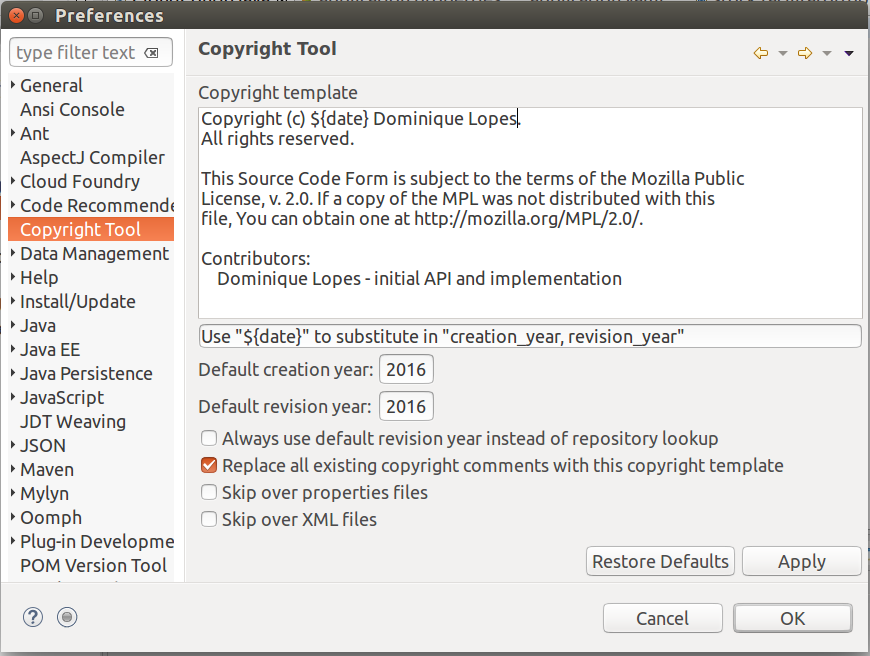
Additionally, we will add the following boilerplate notice to every file of our project:
/* This Source Code Form is subject to the terms of the Mozilla Public
 * License, v. 2.0. If a copy of the MPL was not distributed with this
 * file, You can obtain one at http://mozilla.org/MPL/2.0/. */
But as we don't want to do this manually one by one, we make use of the nice and handy Eclipse Releng Plugin. At first we need to install that plugin in STS via the "Install new Software" menu item of the "Help" menu. We need to add the update site corresponding to our STS installation (if it is not available yet) - http://download.eclipse.org/eclipse/updates/4.6 in my case - in order to select the Eclipse Releng Plugin for installation:
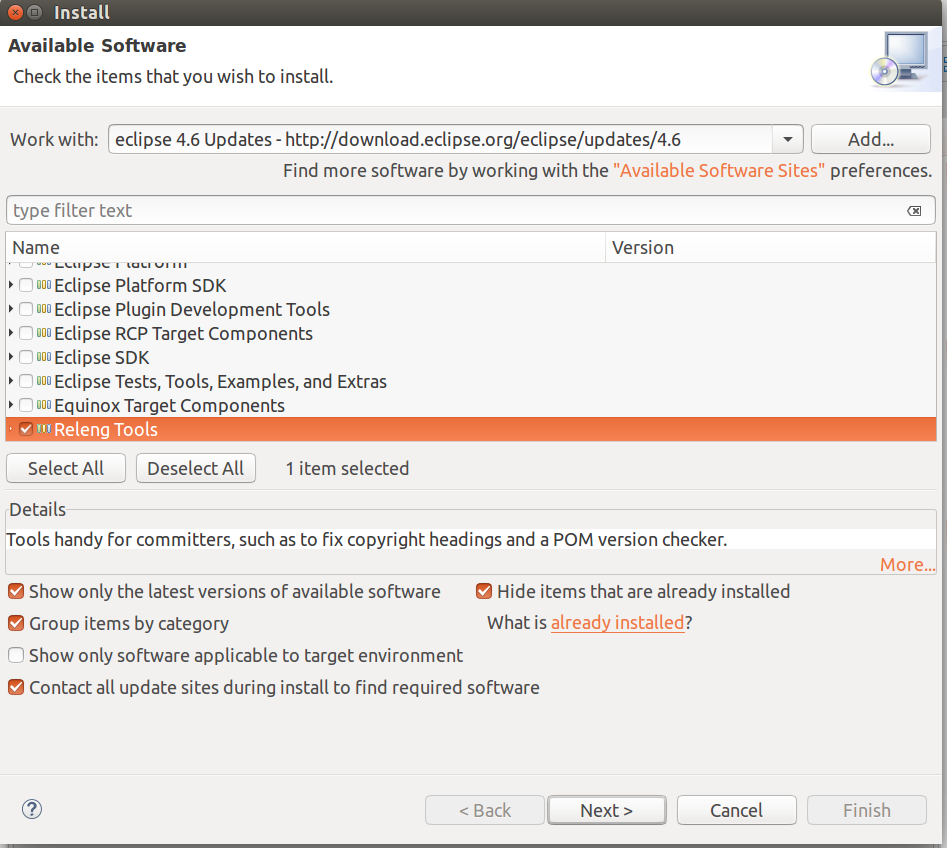
After confirmation of the install procedure and a restart of STS we have the new entry "Copyright Tool" in the "Preferences" menu item of the "Window" menu. Here we can maintain our boilerplate header from avove as a copyright template and make some further settings:
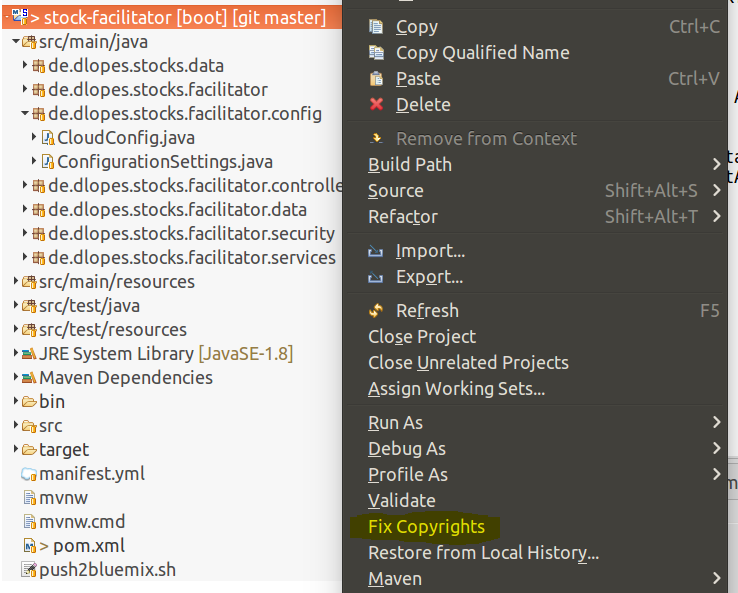
As one of our last steps we need to apply the copyright template to all our files via the "Fix Copyrights" menu entry of the context menu of our stock facilitator project:
This saved us already a great amount of maual work. However, there are a couple of files left that were not touched by the Eclipse Releng Plugin:
- the application.yaml file in src/main/resources
- the manifest.yaml file in the project's root directory
- the home.html in src/main/resources/templates
- the index.html in src/main/resources/templates
- the login.html in src/main/resources/templates
Apperantly, YAML and HTML files are not taken into account by the Eclipse Releng Plugin. That's why we have to add the boilerplate header manually to those files.
Recap
Today, we have choosen an open source software license for our project and applied that together with further documentation to our existing code base. In the next session we will focus again on a more technical topic: we will asses the usage of the Thymeleaf template engine in the light of future requirements for our application. The objective is to make a strategic decision regarding the UI framework to use and to implement the necessary changes.
This blog entry was inspired by the following sources:
- http://www.apache.org/licenses/LICENSE-2.0.txt
- http://www.gnu.org/licenses/lgpl-2.1.html
- https://opensource.org/licenses/cddl1.php
- https://en.wikipedia.org/wiki/Common_Development_and_Distribution_License
- http://www.eclipse.org/legal/epl-v10.html
- http://www.mozilla.org/MPL/MPL-1.1.html
- https://creativecommons.org/licenses/publicdomain/
- http://www.apache.org/legal/resolved.html#category-x
- http://www.slideshare.net/vharshana/open-source-licences-35614097
- https://opensource.com/law/13/1/which-open-source-software-license-should-i-use
- https://opensource.com/law/11/9/mpl-20-copyleft-and-license-compatibility
- http://oss-watch.ac.uk/resources/opensourceyourcode
- https://www.mozilla.org/en-US/MPL/2.0/FAQ/
About me

Dominique Lopes is a Senior SAP Consultant at MHP with more than 10 years experience in Software Development in various programming languages. In his leisure time he enjoys to try out new IT trends in his private software projects.