
Projects
Proof of concept
Written by Dominique LopesIn our first session we have implemented a Spring Boot based application that can run locally and in the cloud.
Today we want to …
- create some domain classes,
- define and implement a service class which loads the stock data,
- implement a JUnit testcase to test our service class,
- make the service implementation configurable and
- display the stock data by means of the Thymeleaf template engine.
Of course, we will run the application in our local environment and in the cloud.
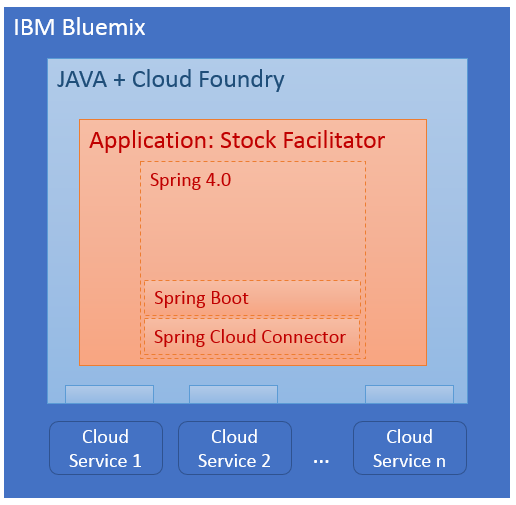
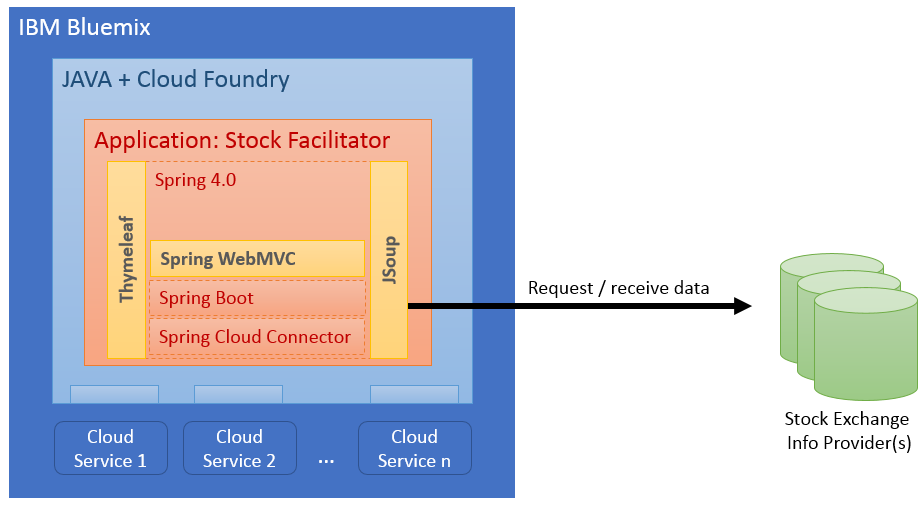
A current high-level component based view of that application looked like this:
Now it is time to start with some real-life enhancements.
Create the Domain Classes
At first, we want to create the domain classes which will hold the information. For now the following rather simple abstraction is fully sufficient:
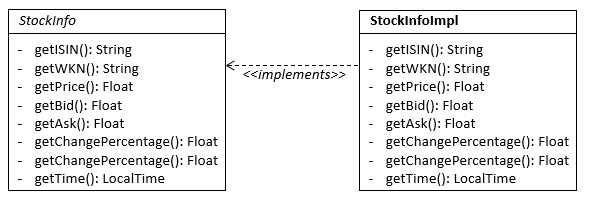
We will define an interface and an implementation for the stock information. One can argue if the definition of the interface is acutally needed but in order to stay flexible it seemed reasonable to me so I simply created it. In the following you can find the source code for the domain classes located in the package de.dlopes.stocks.data.
At first, the source code from the interface:
package de.dlopes.stocks.data;

import java.time.LocalTime;

public interface StockInfo {

	public String getIndex();
	public void setIndex(String index);

        public String getWKN();
	public void setWKN(String wKN);

	public String getISIN();
	public void setISIN(String iSIN);

	public String getName();
	public void setName(String name);

	public Double getPrice();
	public void setPrice(Double price);

	public Double getBid();
	public void setBid(Double bid);

	public Double getAsk();
	public void setAsk(Double ask);

	public Double getChangePercentage();
	public void setChangePercentage(Double changePercentage);

	public Double getChangeAbsolute();
	public void setChangeAbsolute(Double changeAbsolute);

	public LocalTime getTime();
	public void setTime(LocalTime timestamp);

}
And now, the source code from the implementation:
package de.dlopes.stocks.data;

import java.time.LocalTime;

import lombok.Data;

@Data
public class StockInfoImpl implements StockInfo {

	private String index;
	private String WKN;
	private String ISIN;
	private String name;
	private Double price;
	private Double bid;
	private Double ask;
	private Double changePercentage;
	private Double changeAbsolute;
	private LocalTime time;

}
Looking at the service implementation (StockInfoImpl.java), it is impressive that we don't have to define any constructors or getter/setter methods. This is one of the big advantages using Lombok. The @Data annotation in line 7 automatically generates all the boiler-plate coding on the fly for us and makes our class more readable; even the toString(), hashCode() and equals() methods are generated. So, I absolutely recommend this nice and light-weight project library.
Define and Implement Service Class
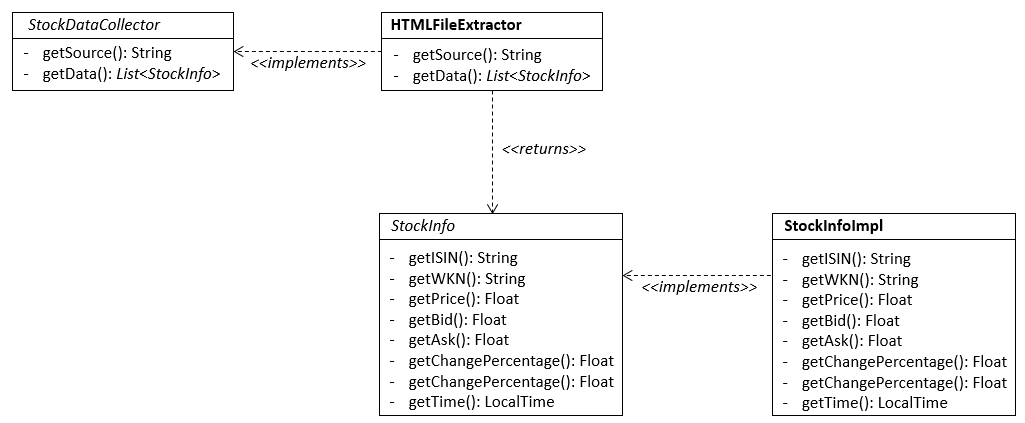
Our next step is to define a service class that will be responsible for gathering all information about the stocks. This interface will act as a facade for the more compex logic that will request infomation from any provider. We will implement a service class against this interface. So, our class diagram looks like this now:
This is the coding for our service class interface in the package de.dlopes.stocks.facilitator.services:
package de.dlopes.stocks.facilitator.services;

import java.util.List;

import de.dlopes.stocks.data.StockInfo;

public interface StockDataCollector {

	public String getSource();

	public List<StockInfo> getData();

}
For now we will create only a an empty implementation because we want to populate the acutal coding in a test-driven approach later on.
package de.dlopes.stocks.facilitator.services;

import java.util.List;

import de.dlopes.stocks.data.StockInfo;

public class HTMLFileExtractor implements StockDataCollector {

	private String url;

	public HTMLFileExtractor(String url) {
		this.url = url;
	}

	@Override
	public String getSource() {
		return this.url;
	}

	@Override
	public List<StockInfo> getData() {
		// TODO: implement something meaningful here
		return null;
	}

}
Write JUnit test
Before we take care of the acutal implementation of our service class we should write a unit test. This enables us to think about the expected results and important requirements for the service implementation. Furthermore once the testcase is written, it will enable us to see if the result of our implementation match our expectations. We can run the testcase any time we want with just one click on a button.
This is much better and less time-consuming then the alternative approach: starting and stopping the server to check the correctness of our implementation.
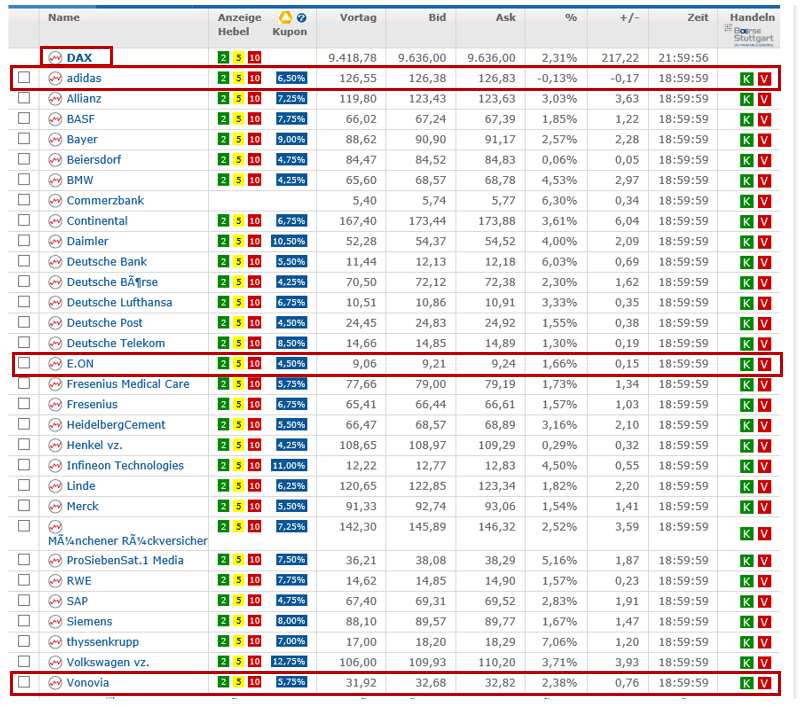
Our implementation for the service class interface we will utilize http://www.finanzen.de - a german website which publishes the most recent stock data for many german and foreign stocks. We will extract the stock information out of a webpage at http://www.finanzen.net/aktien/DAX-Realtimekurse. For our test we Need a stable / not changing version of that webspage. So, we download the HTML page and store it underneath src/test/resources/test.html in our project directory. At the time when I was doing that, the webpage looked like this:
Of course, the contents of this webpage changes every day. So, the testcase won't match the current stock information anymore if you download the webpage yourself now. In order to solve this problem, you can download the HTML file from my GitHub project repository: https://github.com/d-lopes/stock-facilitator/blob/v0.2/stock-facilitator/src/test/resources/test.html
As we don't know the code our implementation yet, the test case will be implemented as a blackbox test. All we know is that we want to extract the information from the webpage shown above. Thus, the following tests should be included:
- two negative tests (the DAX is and Index and no share + empty names are invalid)
- two boundary test (the first and the last row with stock information has to occur)
- one positive test (the data extracted for a random share has to be correct)
And this is the code for our test case:
package de.dlopes.stocks.facilitator.services;

import static org.junit.Assert.assertEquals;
import static org.junit.Assert.assertNotNull;
import static org.junit.Assert.fail;

import java.time.format.DateTimeFormatter;
import java.util.List;

import org.junit.BeforeClass;
import org.junit.Test;
import org.junit.runner.RunWith;
import org.springframework.boot.test.SpringApplicationConfiguration;
import org.springframework.test.context.junit4.SpringJUnit4ClassRunner;

import de.dlopes.stocks.data.StockInfo;
import de.dlopes.stocks.facilitator.StockFacilitatorApplication;

@RunWith(SpringJUnit4ClassRunner.class)
@SpringApplicationConfiguration(StockFacilitatorApplication.class)
public class HTMLFileExtractorTest {

	private static final String url = "file://./src/test/resources/test.html";

	private static HTMLFileExtractor _classUnderTest;

	@BeforeClass
	public static void setup() {
		_classUnderTest = new HTMLFileExtractor(url);
	}

	@Test
	public void testGetData() {

		String source = _classUnderTest.getSource();
		assertNotNull("Source is NUll!", source);

		List<StockInfo> stocks = _classUnderTest.getData();
		assertEquals("unexpected number of stocks", 30, stocks.size());

		for (StockInfo si : stocks) {

			// Guard: avoid empty names
			if ("".equals(si.getName())) {
				fail("empty name for Object" + si.toString());
			}

			// Guard: avoid DAX index
			if ("DAX".equals(si.getName())) {
				fail("DAX included in list" + si.toString());
			}

			// check some values
			if ("adidas".equals(si.getName())) {
				// check values for addidas
				assertEquals("unexpected WKN for adidas", "A1EWWW" , si.getWKN());
				assertEquals("unexpected ISIN for adidas", "DE000A1EWWW0" , si.getISIN());
				assertEquals("unexpected Price for adidas", new Double(126.55) , si.getPrice());
				assertEquals("unexpected Bid for adidas", new Double(126.38) , si.getBid());
				assertEquals("unexpected Ask for adidas", new Double(126.83) , si.getAsk());
				assertEquals("unexpected Change (percentage) for adidas", new Double(-0.13) , si.getChangePercentage());
				assertEquals("unexpected Change (absolute) for adidas", new Double(-0.17) , si.getChangeAbsolute());
				assertEquals("unexpected Time for adidas", "18:59:59" , si.getTime().format(DateTimeFormatter.ISO_TIME));
			} else if ("E.ON".equals(si.getName())) {
				// check values for E.ON
				assertEquals("unexpected WKN for E.ON", "ENAG99" , si.getWKN());
				assertEquals("unexpected ISIN for E.ON", "DE000ENAG999" , si.getISIN());
				assertEquals("unexpected Price for E.ON", new Double(9.06) , si.getPrice());
				assertEquals("unexpected Bid for E.ON", new Double(9.21) , si.getBid());
				assertEquals("unexpected Ask for E.ON", new Double(9.24) , si.getAsk());
				assertEquals("unexpected Change (percentage) for E.ON", new Double(1.66) , si.getChangePercentage());
				assertEquals("unexpected Change (absolute) for E.ON", new Double(0.15) , si.getChangeAbsolute());
				assertEquals("unexpected Time for E.ON", "18:59:59" , si.getTime().format(DateTimeFormatter.ISO_TIME));
			} else if ("Vonovia".equals(si.getName())) {
				// check values for Vonovia
				assertEquals("unexpected WKN for Vonovia", "A1ML7J" , si.getWKN());
				assertEquals("unexpected ISIN for Vonovia", "DE000A1ML7J1" , si.getISIN());
				assertEquals("unexpected Price for Vonovia", new Double(31.92) , si.getPrice());
				assertEquals("unexpected Bid for Vonovia", new Double(32.68) , si.getBid());
				assertEquals("unexpected Ask for Vonovia", new Double(32.82) , si.getAsk());
				assertEquals("unexpected Change (percentage) for Vonovia", new Double(2.38) , si.getChangePercentage());
				assertEquals("unexpected Change (absolute) for Vonovia", new Double(0.76) , si.getChangeAbsolute());
				assertEquals("unexpected Time for Vonovia", "18:59:59" , si.getTime().format(DateTimeFormatter.ISO_TIME));
			}


		}
	}

}
This concludes the testing part. Of course, if we run the testcase now it will fail. So we need to finish our service inmplementation as a next step.
Finish service implementation
As explained above we want to extract data from an html page. With JSoup we can do that conviniently in a JQuery like manner. Another plus for this library is that it is fairly robust and works with webpages, that can contain a lot of java script code, frames and even might be not well formed. In order to use the JSoup library we simply add it as a dependency to our maven pom.xml:
                <dependency>
			<groupId>org.jsoup</groupId>
			<artifactId>jsoup</artifactId>
			<version>1.9.2</version>
		</dependency>
Finally we will add the necessary coding to our service implementation:
package de.dlopes.stocks.facilitator.services;


import java.io.File;
import java.io.IOException;
import java.net.URL;
import java.text.NumberFormat;
import java.text.ParseException;
import java.time.LocalTime;
import java.time.format.DateTimeFormatter;
import java.time.format.DateTimeParseException;
import java.util.ArrayList;
import java.util.List;
import java.util.Locale;

import org.jsoup.Jsoup;
import org.jsoup.nodes.Document;
import org.jsoup.nodes.Element;
import org.jsoup.select.Elements;
import org.springframework.util.StringUtils;

import de.dlopes.stocks.data.StockInfo;
import de.dlopes.stocks.data.StockInfoImpl;

public class HTMLFileExtractor implements StockDataCollector {

	private String url;

	public HTMLFileExtractor(String url) {
		this.url = url;
	}

	@Override
	public String getSource() {
		return this.url;
	}

	@Override
	public List<StockInfo> getData() {
		List<StockInfo> res = new ArrayList<StockInfo>();

		try {

			Document doc = null;
			if (url.startsWith("file://")) {
				File input = new File(url.replaceFirst("file://",""));
				doc = Jsoup.parse(input, "UTF-8");
			} else {
				URL input = new URL(url);
				doc = Jsoup.parse(input, 30000);
			}

			Elements elements = doc.body().select("form#realtime_chart_list > table tr");
			for (Element e : elements) {
				String text = e.select("td > a.content_one_line").text();

				// Guard: move on when the text is empty or represents the whole index
				if (StringUtils.isEmpty(text) || "DAX".equals(text)) {
					continue;
				}
				StockInfo si = new StockInfoImpl();
				si.setName(text);
				text = e.select("td > div.display_none").text();
				if (StringUtils.isEmpty(text)) {
					text = e.select("td ").eq(3).text();
				}
				si.setPrice(convert2Double(text));
				Element e2 = e.select("td > div[field='bid']").first();
				text = e2.attr("item");
				si.setISIN(convert2ISIN(text));
				si.setWKN(convert2WKN(text));

				text = e2.text();
				si.setBid(convert2Double(text));

				text = e.select("td > div[field='ask']").text();
				si.setAsk(convert2Double(text));

				text = e.select("td > div[field='changeabs']").text();
				si.setChangeAbsolute(convert2Double(text));

				text = e.select("td > div[field='changeper']").text();
				si.setChangePercentage(convert2Double(text));

				text = e.select("td > div[field='quotetime']").text();
				si.setTime(convert2Timestamp(text));

				// by default: index = DAX
				si.setIndex("DAX");
				res.add(si);
			}

		} catch (IOException e) {
			e.printStackTrace();
		}

		return res;
	}

	private String convert2ISIN(String input) {
		String res = null;
		try {
			res = input.substring(input.length() - 12);
		} catch (IndexOutOfBoundsException e) {
			// do nothing -> we just want to be a little more robust
		}

		return res;
	}

	private String convert2WKN(String input) {
		String res = null;
		try {
			res = input.substring(input.length() - 7, input.length() - 1);
		} catch (IndexOutOfBoundsException e) {
			// do nothing -> we just want to be a little more robust
		}

		return res;
	}

	private LocalTime convert2Timestamp(String input) {
		LocalTime lt = null;
		try {
			lt = LocalTime.parse(input, DateTimeFormatter.ISO_LOCAL_TIME);

		} catch (DateTimeParseException e) {
			// do nothing -> we just want to be a little more robust
		}

		return lt;
	}

	private Double convert2Double(final String input) {
		Double res = null;
		try {
			String str = input.replaceAll("%", "");
			NumberFormat nf = NumberFormat.getInstance(Locale.GERMANY);
			res = nf.parse(str).doubleValue();
		} catch (ParseException e) {
			// do nothing -> we just want to be a little more robust
		}

		return res;
	}

}
Using the JSoup library we are able to addess the rows and single columns precisely so that we can extract all the information about our stocks and can populate our domain classes from above. Keep in mind that this is just a temporary solution. In the future we might be able to provide a nicer service implementation (e. g. based on a proper web service) to retrive the stock data (that's why we have defined a Service interface in the first place).
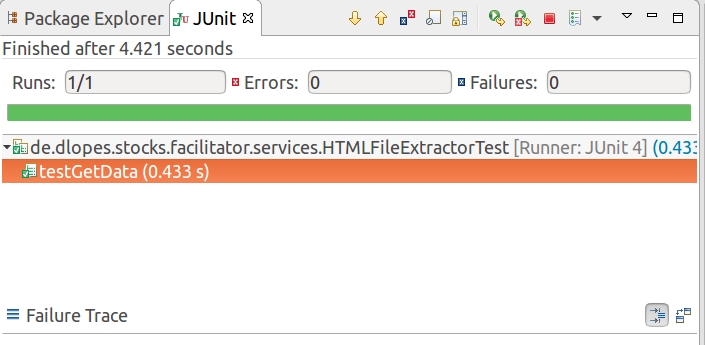
Ok, with this implementation our testcase should turn green when we run it:
So all done? Not quite yet :)
Configuring our application
Did you notice that we have specified the URL to our testfile directly in the testcase? That seems to be OK for now, but eventually we want to run the code on a server. So we have to tell our service implemetation that is shall look at a different location/URL for the most current stocks.
Presumably there will be even more configs of that kind which is why we will create this YAML based configration file underneath ./src/main/resources/application.yaml:
config:
  url: 'http://www.finanzen.net/aktien/DAX-Realtimekurse'
Spring has some very nice features which will make it very easy for us to access this YAML configuration. We simply create a configuration settings class and annotate it with @ConfigurationProperties as well as the prefix "config":
package de.dlopes.stocks.facilitator.config;

import org.springframework.boot.context.properties.ConfigurationProperties;
import org.springframework.context.annotation.Bean;
import org.springframework.stereotype.Component;

import de.dlopes.stocks.facilitator.services.HTMLFileExtractor;
import de.dlopes.stocks.facilitator.services.StockDataCollector;
import lombok.Data;

@Data
@Component
@ConfigurationProperties(prefix="config")
public class ConfigurationSettings {

	private String url;

	@Bean
	public StockDataCollector getDataCollector() {
		return new HTMLFileExtractor(url);
	}

}
This tells spring to search for our application.yaml file and to bind all configurations with matching names to the properties of our ConfigurationSettings class. So the URL defined in the application.yaml is now bound to the property "url" in our configuration settings class. Again we are using the @Data Annotation to generate the boiler-plate code of this class. Furthermore we have used the @Bean annotation to make our implementation of the stock data collector available for Dependency Injection in other classes. There more elegant ways of providing the service implementation - e. g. by means of a corresponding Factory Class - but this is something we will improve in one of the upcoming session. For now our way of doing it it is just suitable.
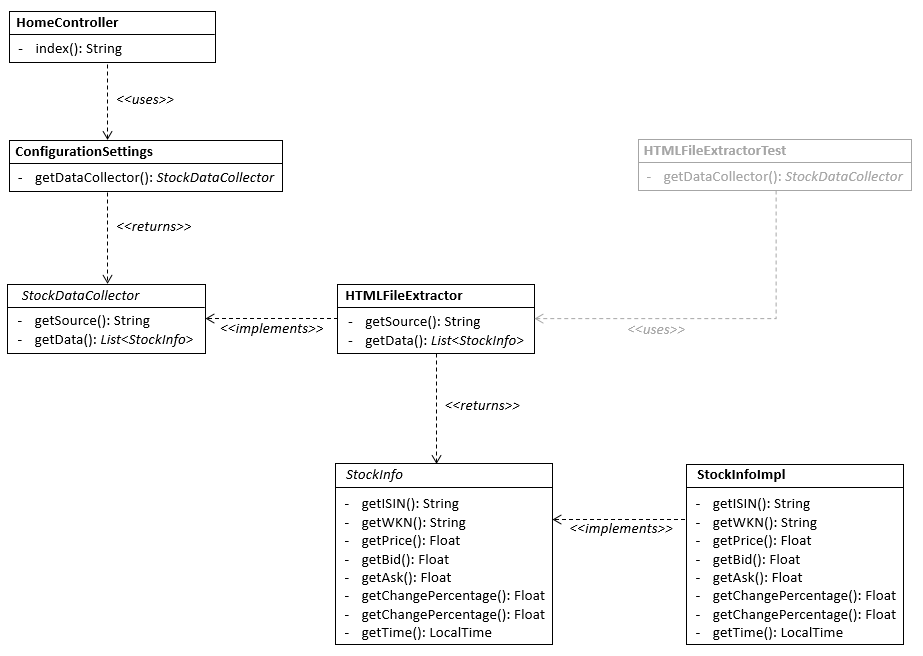
As a result we can simply use our implementation of the stock data collector in any class that we need to. Currently we need the service implementation in the HomeController in order to give it access to the gathered stock information. Once we are finish with our implementation, our class diagram will look like this:
So, we will enhance our HomeController from the last session a little bit:
package de.dlopes.stocks.facilitator.controller;

import org.springframework.beans.factory.annotation.Autowired;
import org.springframework.stereotype.RestController;
import org.springframework.web.bind.annotation.RequestMapping;

import de.dlopes.stocks.facilitator.service.StockDataCollector;
import de.dlopes.stocks.facilitator.config.ConfigurationSettings;

@RestController
public class HomeController {

	@Autowired
	ConfigurationSettings cs;

	@RequestMapping("/")
        public String index() {
		StockDataCollector dataCollector = cs.getDataCollector();
		return dataCollector.getData();
    }

}
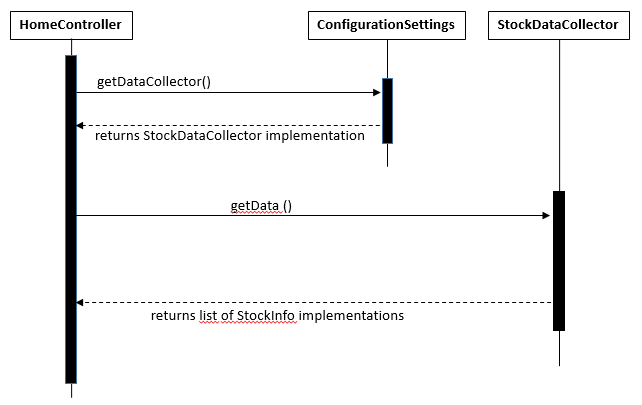
In lines 13 and 14 we inserted the ConfigurationSettings class now and marked it for dependency injection by the Spring Framework. In lines 18 and 19 we are using the configuration settings to retrieve our service implementation, to invoke it's getData() method and finally return the result. The following sequence diagram illustrates the processing logic described above:
Now our implementation is almost complete. We need just one more piece to our puzzle for this session.
Return results as HTML Response
Our coding returns the gather stock data only in JSON format so far. This is fine for a REST service but not very readable for humans in a web browser. So we want to change that and send the results in a plain but nice and readable HTML table. First of all we need to extend our maven pom.xml once more. We add the Thymeleaf template engine, which integrates seamlessly with extensions of the Spring family:
                <dependency>
			<groupId>org.springframework.boot</groupId>
			<artifactId>spring-boot-starter-thymeleaf</artifactId>
		</dependency>
Now we need a template that can render our data. That's why we create a normal HTML file underneath ./src/main/resources/templates/index.html:
<!DOCTYPE HTML>
<html xmlns:th="http://www.thymeleaf.org">
<head>
    <title>Getting Started: Serving Web Content</title>
    <meta http-equiv="Content-Type" content="text/html; charset=UTF-8" />
</head>
<body>

  <table>
    <thead>
      <tr>
      	<th>Index</th>
        <th>WKN</th>
        <th>ISIN</th>
        <th>Name</th>
        <th>Price</th>
        <th>Bid</th>
        <th>Ask</th>
        <th>Change (percentage)</th>
        <th>Change (absolute)</th>
        <th>Time</th>
      </tr>
    </thead>
    <tbody>

      <tr th:each="si : ${stocks}">
      	<td th:text="${si.Index}">XYZ</td>
      	<td th:text="${si.WKN}">ABCDEF</td>
      	<td th:text="${{si.ISIN}}">DE000ABCDEF0</td>
      	<td th:text="${{si.name}}">Deutsche Bank</td>
      	<td th:text="${{si.price}}">12,67</td>
      	<td th:text="${{si.bid}}">13,45</td>
      	<td th:text="${{si.ask}}">12,99</td>
      	<td th:text="${{si.changePercentage}}">1,49%</td>
      	<td th:text="${{si.changeAbsolute}}">0,75</td>
      	<td th:text="${{si.time}}">11:54:34</td>
      </tr>

    </tbody>
  </table>

</body>
</html>
Finally, we adjust our HomeController once more so that it does not act like a REST service which generates a JSON response:
package de.dlopes.stocks.facilitator.controller;

import org.springframework.beans.factory.annotation.Autowired;
import org.springframework.stereotype.Controller;
import org.springframework.ui.Model;
import org.springframework.web.bind.annotation.RequestMapping;

import de.dlopes.stocks.data.StockDataCollector;
import de.dlopes.stocks.facilitator.config.ConfigurationSettings;

@Controller
public class HomeController {

	@Autowired
	ConfigurationSettings cs;

	@RequestMapping("/")
        public String index(Model model) {
		StockDataCollector dataCollector = cs.getDataCollector();
		model.addAttribute("stocks", dataCollector.getData());
		return "index";
        }

}
In line 11 we changed the @RestController annotation to a @Controller annotation in order to indicate that we want to return an HTML response. Furthermore we extended the index method in lines 18 to 21. It is using a model class now which is populated with the stock information from our service implementation. Finally we return our template name "index" so that the Spring WebMVC Framework can take care of the rendering of the HTML Response. For this it utilizes the Thymeleaf template engine.
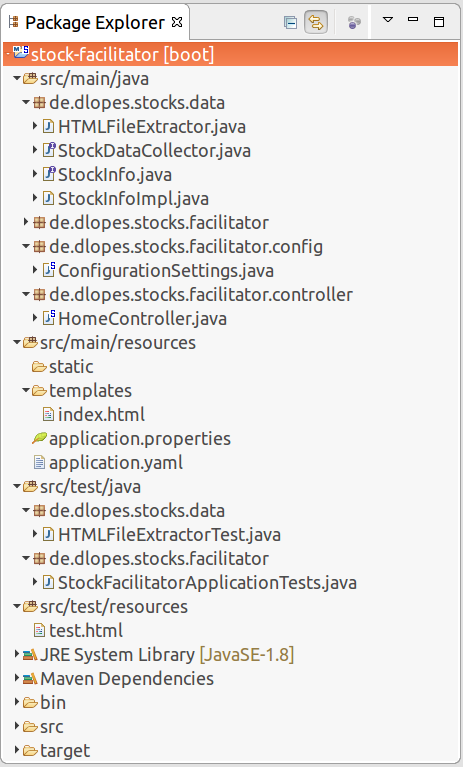
That's it. Our project directory should look like this now:
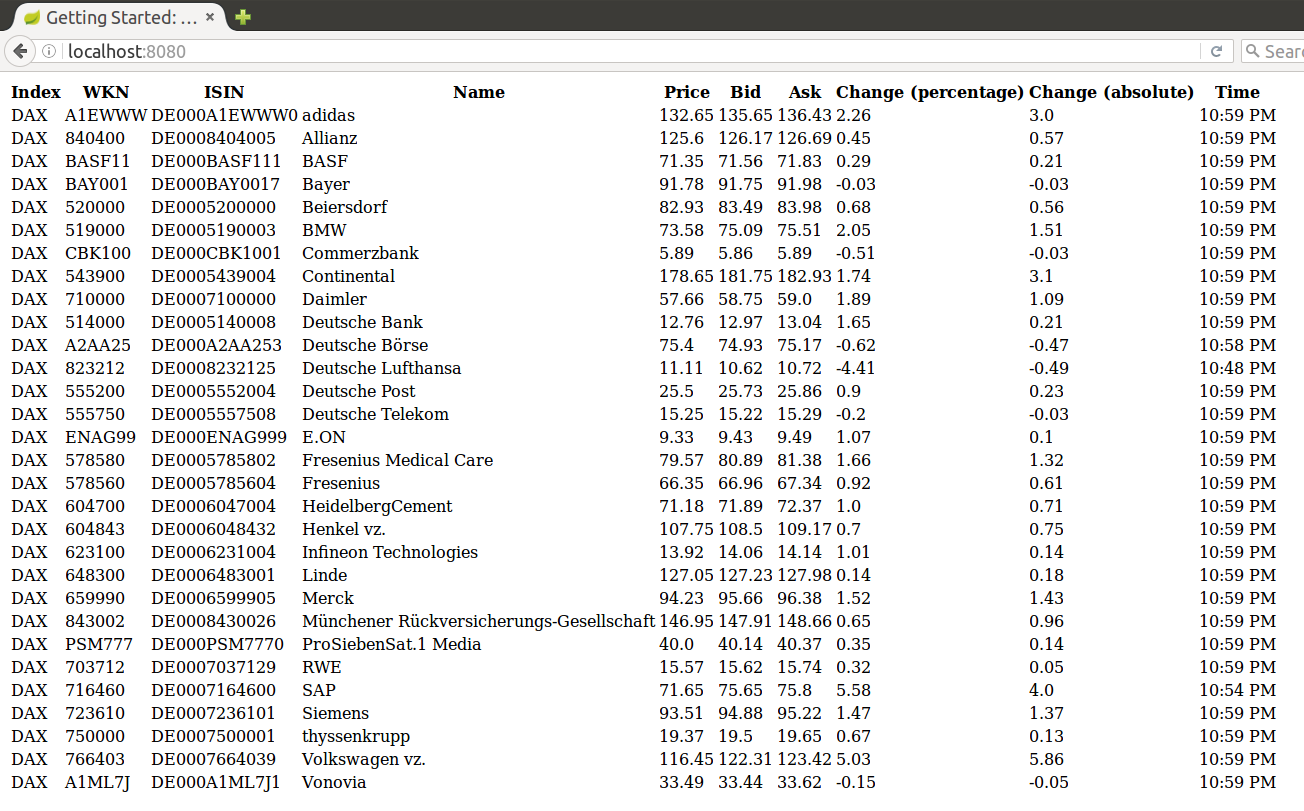
Now we can fire up the embeded tomcat with spring boot again and test our implementation of the stock data collector in web browser in our local Environment:
As last step we upload our changes again to bluemix and test it once more in a cloud environment:
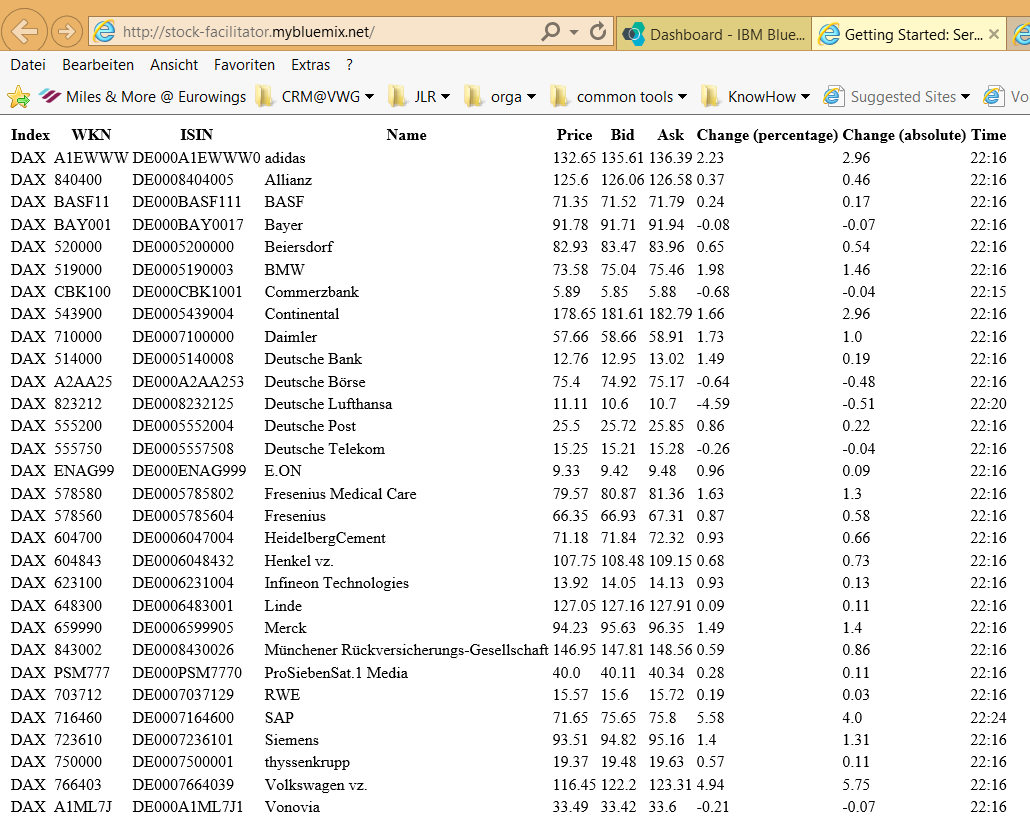
Et voila. It is working also there.
Recap
Today, we've added some real coding to our application which extracts the most recent stock information from a public website . Furthermore, we changed the presentation layer of our application and leveraged the Thymeleaf template engine in order to send our responses in HTML instead of JSON format. You can download the source code from my GitHub project page: https://github.com/d-lopes/stock-facilitator/releases/tag/v0.2
The current high-level component based view of the application changed slightly:
In the next session we will secure the application against unauthorized requests.
This tutorial was inspired by the following sources:
- http://jnb.ociweb.com/jnb/jnbJan2010.html
- https://jsoup.org/cookbook/input/load-document-from-file
- https://jsoup.org/cookbook/extracting-data/attributes-text-html
- http://blog.codeleak.pl/2014/09/using-configurationproperties-in-spring.html
- http://www.thymeleaf.org/doc/tutorials/2.1/thymeleafspring.html#spring-based-template-resolution
associated Tags:
About me

Dominique Lopes is a Senior SAP Consultant at MHP with more than 10 years experience in Software Development in various programming languages. In his leisure time he enjoys to try out new IT trends in his private software projects.